
In mid-October I introduced the FT8 module of HAM-Tools here, back then with version 1.57. Just over two weeks have passed since, with five new versions and two hotfixes. Time for an overview of what has changed and what comes next.
Log analysis: your own log on the map (1.58)
New in the sidebar is Log Analysis. It shows all QSOs of a log on a world map, with great-circle lines to the other stations and your own locations. You can analyse the active log, any other logbook or simply an ADIF file.
A filter bar narrows things down by period, band, mode, callsign, programme or reference. Tiles show QSOs, countries, bands and the best DX. For POTA, SOTA and WWFF, Log Analysis also evaluates your own activations according to the rules. Below that there are charts and a sortable table, and the map can be exported as an image. Contest QSOs without a locator appear at the centre of their country, clearly marked as an estimate.
DX assistant: what should I work now? (1.59)
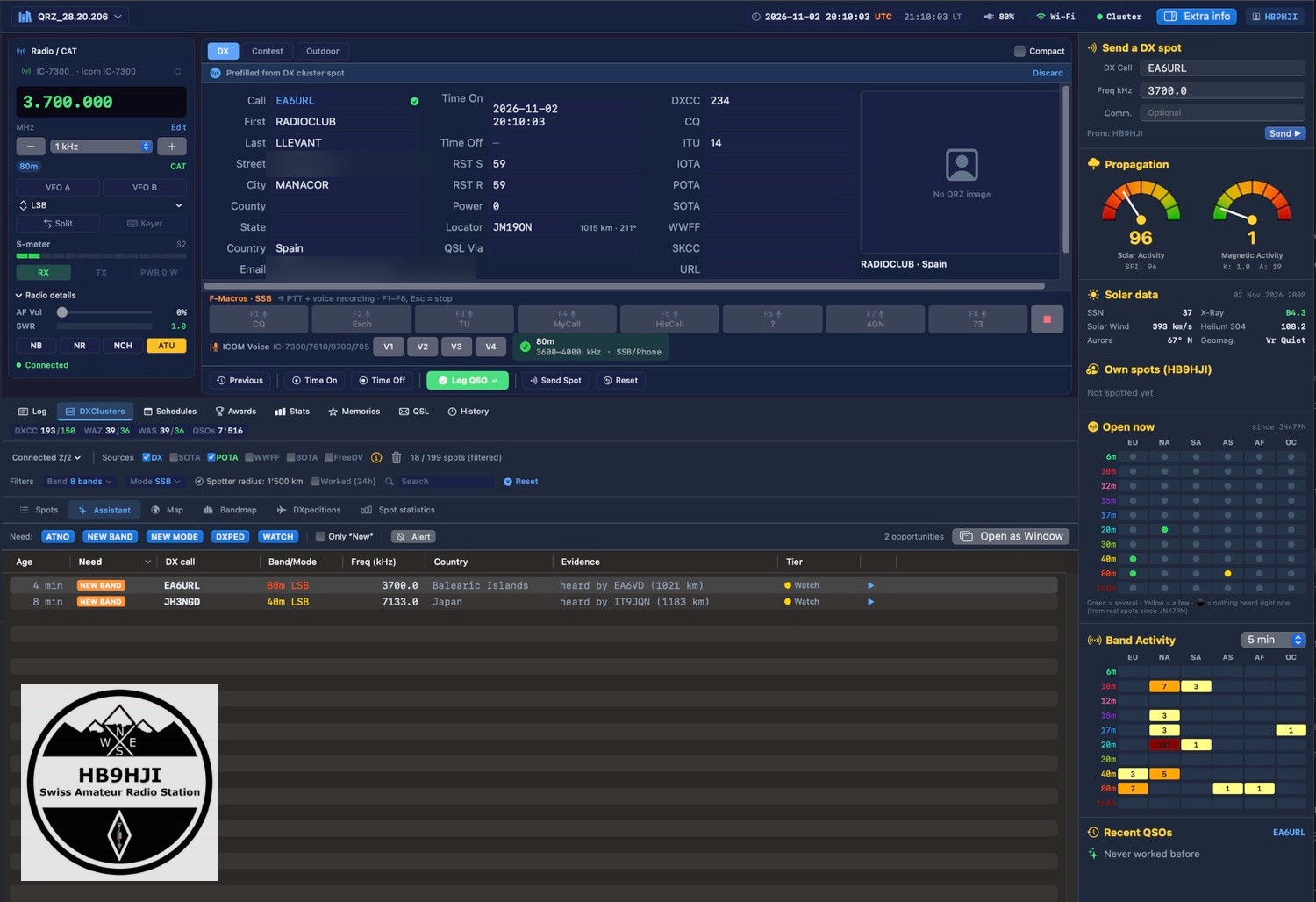
During a contest, thousands of spots flow through the DX cluster. The new DX Assistant picks out what really counts for your own log: ATNO, meaning a new country, plus NEW BAND, NEW MODE, DXpeditions and your own watch list. It only shows them when propagation fits, though. The «Evidence» column names the spotters near you who heard the station in the last 15 minutes. Without fresh evidence the line drops out again.
If you like, the assistant announces new opportunities with a sound and a macOS notification. Nothing happens at the radio without your click.
Further changes in the logbook:
- Awards count by the rules. For DXCC, WAS and WAZ only LoTW and paper cards now count as confirmed, because the ARRL does not accept eQSL for any of its awards. The numbers may drop as a result, but they are correct.
- Edited QSOs are re-sent. If you corrected a report or locator after uploading, Club Log, LoTW, eQSL and co. used to keep the old data. Now HAM-Tools remembers such changes and sends them again.
- QSL cards can be recorded directly in the QSO editor, with date and route (direct, bureau, manager).
- The logbook has gained an IOTA field.
Our club meeting as a load test (1.60 and 1.61)
During CQ WW SSB, HAM-Tools ran in contest mode at our club meeting at HB9TG, with CAT, cluster and five open windows. It felt noticeably sluggish, and that triggered two versions full of performance work. All the CPU problems we found there under load have since been fixed.
The cause was not the cluster itself. Every small change, such as a new S-meter value or a new spot, made the whole logbook window recalculate. Now only the parts that actually display the value update. Measured with the same windows, CPU load in contest mode fell from 23 to about 6 percent. In 1.61 it was the S-meter’s turn: with a transceiver connected the app used to sit at 14 percent, now it is 3.4 percent. For a laptop in a camper or on a POTA activation, that means more battery.
On top of that come a few things you notice straight away in a contest:
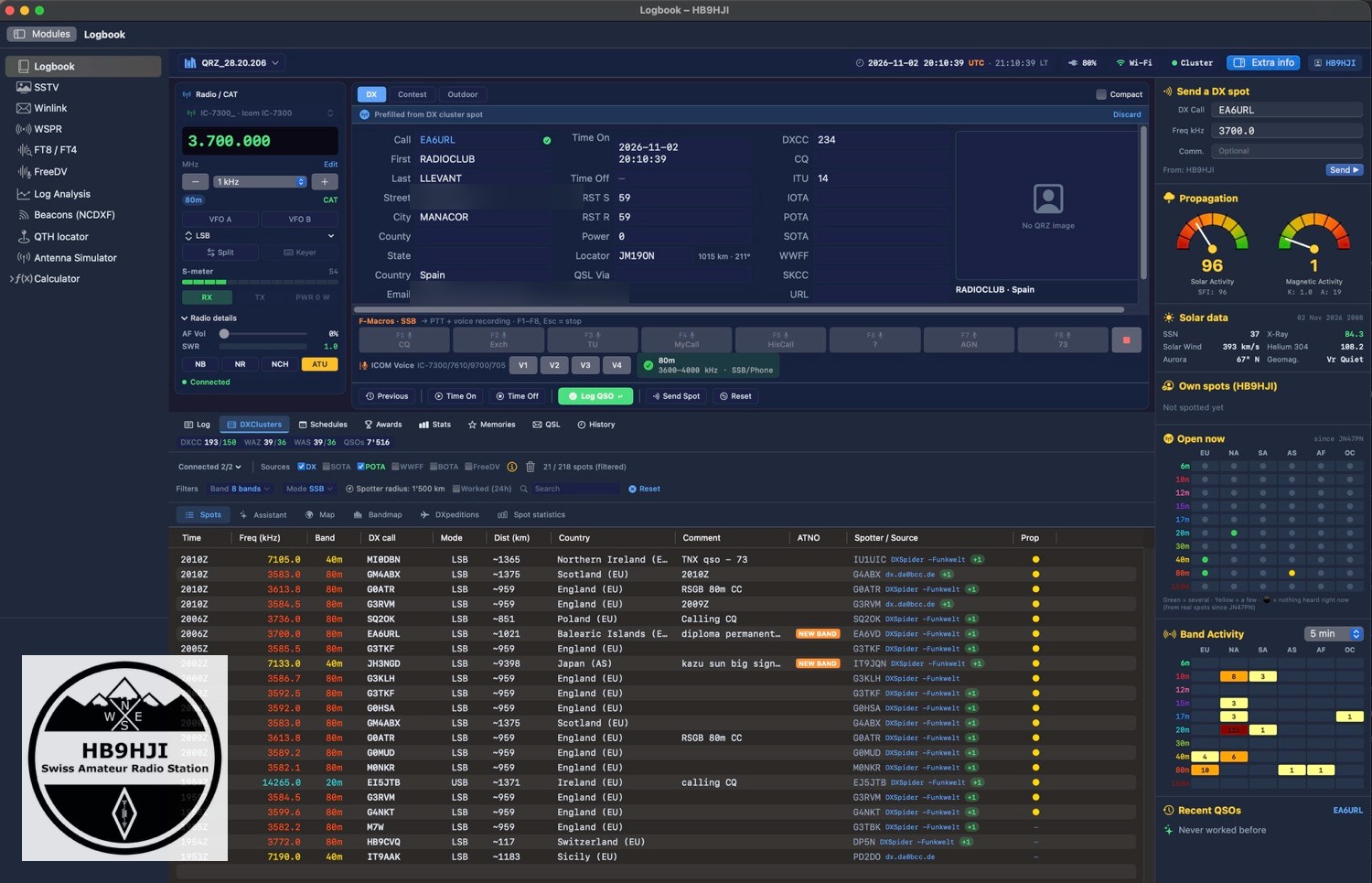
- The spot list pauses while the mouse is over it. New spots no longer push the rows away, and an orange pill counts them. During CQ WW it was all too easy to click the wrong station.
- The Super Check Partial search across about 230,000 callsigns runs in the background and no longer slows down typing.
- Closed windows no longer keep calculating invisibly.
New: the Forecasts window (1.61)
Which band is open right now? The new Forecasts window gives two answers:
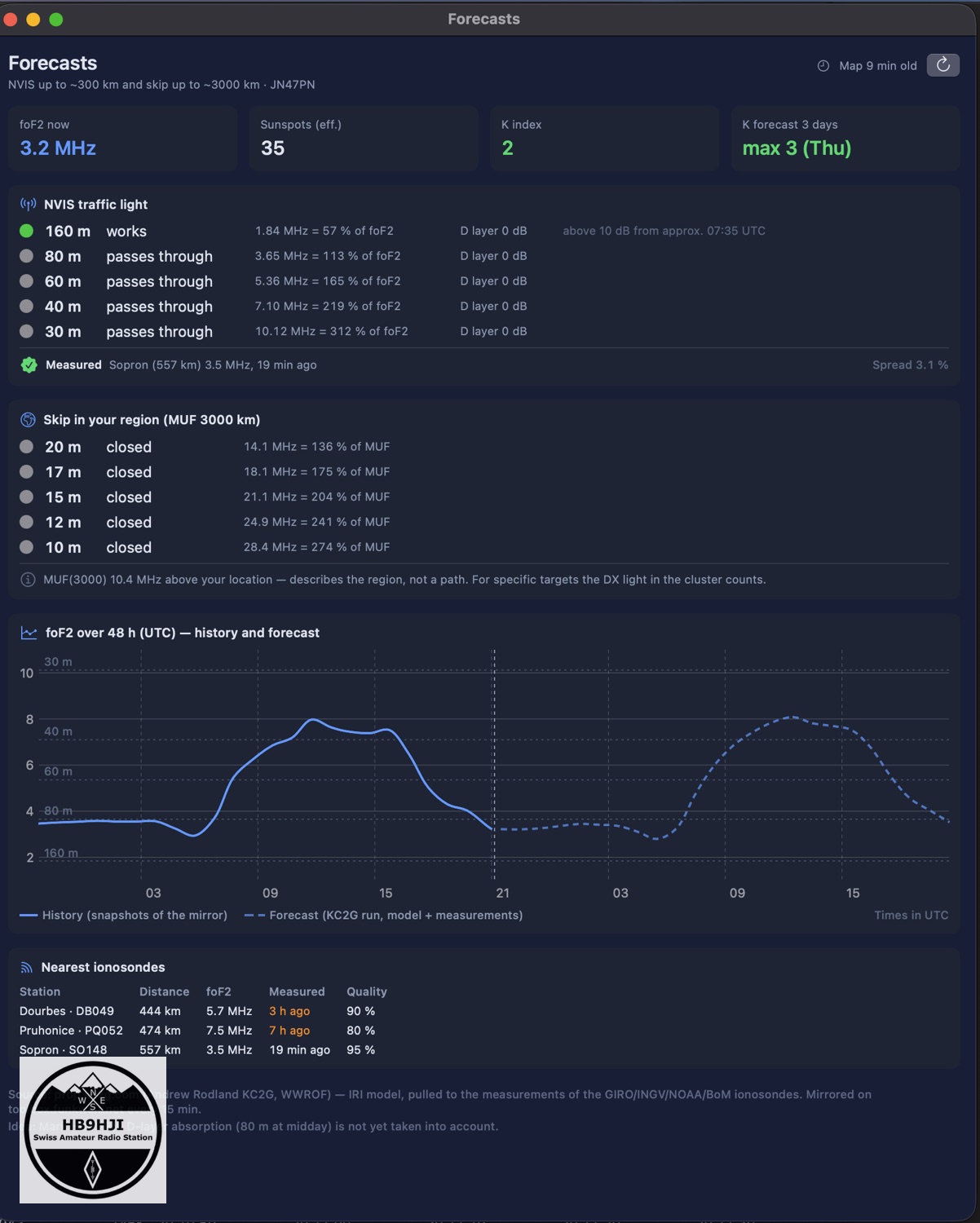
- The NVIS traffic light for 80, 60, 40 and 30 m, meaning steep paths straight up over 50 to 300 km. It is based on the critical frequency foF2 above your own locator.
- The skip traffic light for 20 to 10 m, from the MUF of the region.
There are also tiles with foF2, sunspot number and K index, the NOAA three-day K forecast, the foF2 curve over 48 hours and the nearest ionosondes with their distance and the age of their measurement. The data comes from Andrew KC2G, who continuously pulls an ionosphere model towards the ionosonde measurements. Green only appears when a fresh ionosonde measurement nearby backs the forecast; otherwise the light stays yellow at most.
The idea, mockup included, came from Mark HB9DRN. For NVIS operation in emergency communications or on outdoor activations it is a real help.
FT8 and spot clicks
The FT8 module has seen plenty of changes too:
- /P and /R are now transmitted as long as the standard message allows it. Prefixes and other suffixes are still dropped. Why that is so is explained in my post on prefixes and suffixes in FT8.
- HAM-Tools speaks the WSJT-X interface. Programs such as GridTracker or JTAlert see the decodes and logged QSOs as if everything came from WSJT-X. For now this only works in one direction; replies and transmit stop from these programs will follow later.
- The radio now follows the FT8 module without a click on «QSY».
When you click a spot, sideband and frequency are now right in the places where things used to go wrong. Digital modes end up in USB-D on all bands. Below 10 MHz they used to be set to LSB-D, where the signals are mirrored. FT8 spots go to the dial frequency instead of the reported signal frequency, and 60 m runs in USB. And a spot comment like «TEAM» or «CAMPING» no longer switches to AM.
Two hotfixes
It didn’t go entirely without hiccups. Both bugs were spotted quickly, though, and fixed the same day:
- 1.61.1: The «Transmit» button in the FT8 module always called «CQ POTA», even from a normal log. René HB9HJL noticed it.
- 1.61.2: I wanted to store the IC-705 Wi-Fi password more securely, in the macOS keychain instead of in plain text. While testing, a much bigger bug turned up. If the radio could not be reached at the stored IP, for example after a new DHCP address, HAM-Tools crashed on launch, so fast that you could not even get to the settings. That is fixed.
If you are affected and the app no longer starts at all, this Terminal command gets you back in:
defaults write com.hb9hji.hamrechner cat.autoConnect -bool false
Then start the app, correct the IP under Settings → CAT and switch auto-connect back on. Or simply download 1.61.2 from the Toolbox.
What comes next
Quite a bit is already finished for the next version:
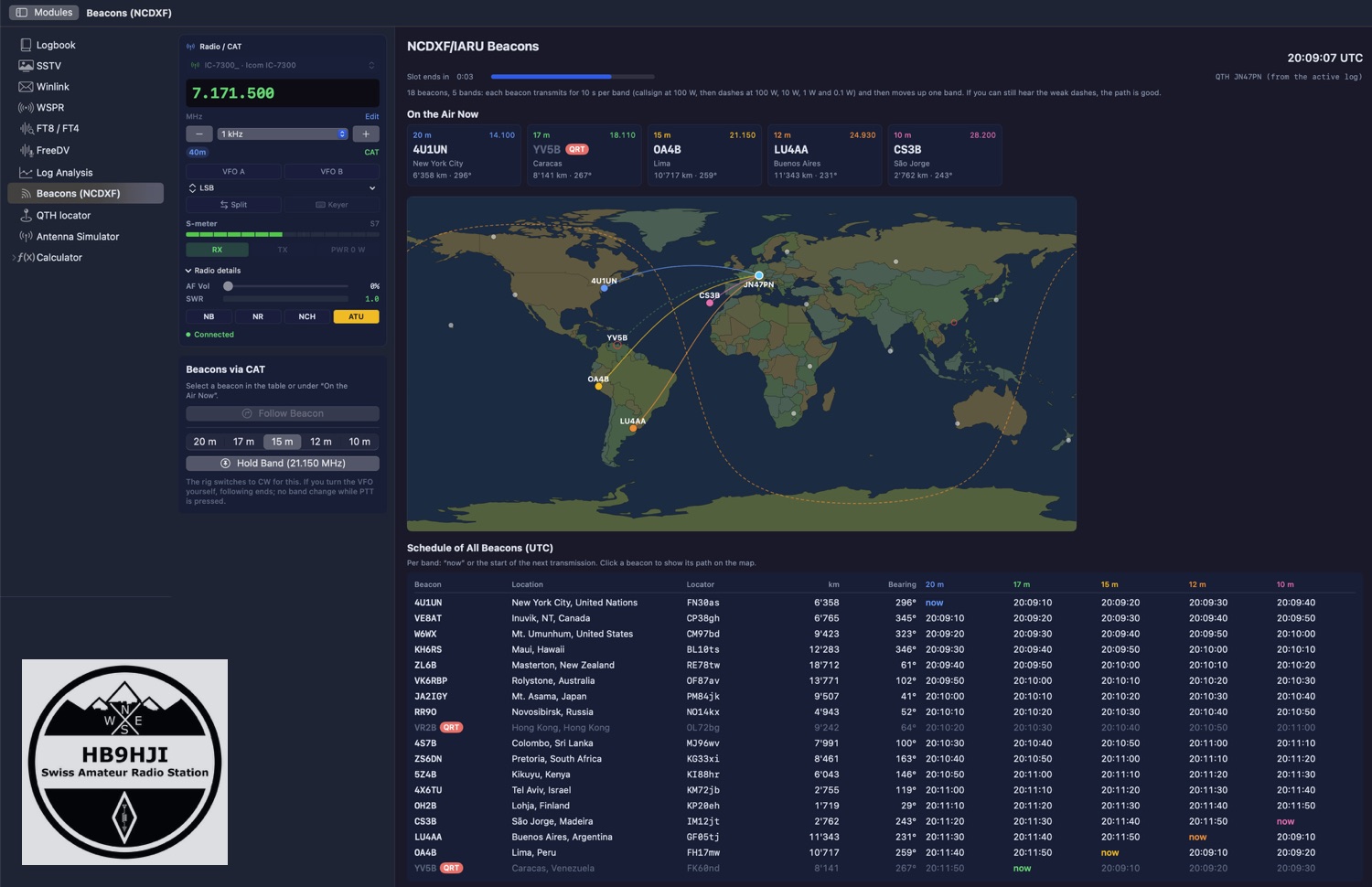
- Beacons (NCDXF): A new module shows which of the 18 beacons of the international beacon project is currently transmitting on 20 to 10 m, with map, countdown and schedule. If you like, the radio follows a beacon from band to band via CAT.
- Absorption in the forecast: The NVIS traffic light takes D-layer absorption into account. 80 m will then no longer show green at midday in summer, and 160 m is added.
- FT8: Band Activity shows country and distance as in WSJT-X. «Who hears me?» collects PSK Reporter reception reports after every transmission, even without the map open. And clicking a CQ now answers in the next slot instead of half a minute later.
- DX cluster: All prefixes are matched to a country via AD1C’s country file. Japanese callsigns such as JF or 7K will then no longer show up as «Unknown».
- The IC-705 password will then live in the keychain.
Further down the list are RTTY, management of repeaters and channels with CHIRP import, and the second part of the WSJT-X interface. We are working hard on it.
Thank you
A pace like this is only possible with people who test and report:
- René HB9HJL tests tirelessly and reliably reports what he notices.
- Mark HB9DRN got the forecasts rolling.
- DL5IAO prompted the fixes to spot clicks, FT8 and Winlink with his bug reports and asked for the new FT8 columns.
- Kes M0PKZ reported from his Flex-6300 that CAT did not connect on its own at launch. That became auto-connect.
HAM-Tools runs on macOS 14 and later. The current version is available at toolbox.funkwelt.net, where you will also find the full changelog. The app tells you about new versions by itself.
73 de Chris, HB9HJI
Leave a Reply